Automated assessment provides many advantages to instructors, students, and institutions. However, due to the special requirements of science, technology, engineering, and mathematics education, many assessment systems simply cannot meet the needs of these courses. Fundamental issues such as the display of standard mathematical notation, the possibility of many correct-but-different answers, and mathematical equivalency make most assessment tools inadequate for STEM courses. Maple T.A., the online testing and assessment system from Maplesoft, was designed especially to take into account the needs of mathematical assessment. It handles all these issues, and provides many additional features to support STEM education. With Maple T.A., STEM educators can finally take advantage of the benefits of automated assessment.
Online testing and assessment has opened up great opportunities for the modern educator. Good automated assessment tools can help consolidate student understanding, support self-directed learning, give instructors more time to focus on other teaching tasks, make it easier to manage growing class sizes, and much more. While these systems are of tremendous use in some subjects, initially their benefits were not readily available in science, technology, engineering, and mathematics (STEM) courses, because the assessment systems could not meet the specialized needs of these subject areas. However, a system is available today that provides the bene ts of automated assessment to STEM instructors and students. This article examines how Maple T.A., the online testing and assessment system from Maplesoft, enables STEM educators to fully leverage automated assessment in meaningful ways.
There are many advantages to using online automated assessment tools that benefit students, instructors, and institutions.
One of the most obvious advantages is that students get instant feedback on their assignments. While students are still actively engaged in learning the material, they can find out if they understand it as well as they think they do, and take corrective action immediately if they don't. Instant feedback helps students know what they know, so they can focus their studying, feel confident in their abilities, and solidify their conceptual foundations before moving on to new topics.
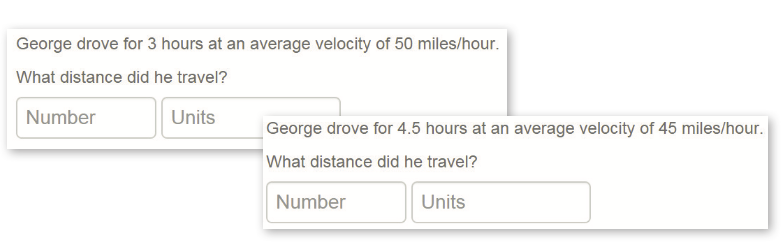
Another important benefit offered in many systems is the ability to generate many similar questions from a single question template. Using this feature, instructors can give students lots of opportunities to practice, without going to the effort of producing and grading extra assignments. In addition, because each student can be given a different version of the same question, these systems limit cheating while encouraging productive collaboration. Instead of sharing answers for their assignments, students discuss the process of finding the solution, and then each student does their own work to answer their individual question.
For instructors, automated assessment means they spend less time marking assignments and more time on other aspects of the course. Time formally spent on producing answer keys for markers, grading stacks of assignments, and manually entering marks can now be spent on enriching course materials, providing individual assistance, developing enrichment questions, or anything else the instructor wants to do but rarely has the time for. Without the demands of manual grading, instructors also have the luxury of offering exactly as many assignments as they feel the course needs to reinforce the course material, without being limited by the number of available teaching assistant hours or their own time constraints.
In addition, students are not the only ones who benefit from instant feedback on tests and assignments. Instructors, too, can look at the results immediately after the assignment is due. If they find that the majority of the class had problems with a particular concept, they can provide a review of that material in the next lecture, before moving on. Identifying and correcting conceptual misunderstandings immediately makes life much easier for both students and instructors.
For the institution, automated testing tools offer very practical advantages - no more photocopying and distribution of assignments and tests, no disputes over lost assignments, no need for massive "grading parties" for large-scale testing. Of particular value for many institutions is that the logistical nightmare of placement testing can be completely eliminated. Students can complete their placement tests from home, long before they arrive on campus, so class sizes, instructors, and room assignments for each section can be settled well in advance of the first week of classes. In addition, institutions can save money on their grading budgets, as they reduce the need for teaching assistants while still maintaining their high standards of education and student success.
Unfortunately, all these benefits have not been so readily available for STEM education, because STEM has specialized needs and requirements that most automated assessment systems cannot handle.
Even something as simple, and as fundamental, as using standard mathematical notation is a significant challenge. Properly displaying mathematical notation in the question is one problem, and providing a means for students to enter their answers is another. If the math itself doesn't look right, students will make mistakes reading the question and entering their answers, and those mistakes will have nothing to do with their understanding of the mathematics itself. As a result, students are frustrated, instructors frequently have to adjust marks manually to account for "syntax errors", and neither students nor instructors receive completely reliable feedback from their assignments.
Then there is the problem of what types of questions the system supports. Standard question types likemultiple choice, fill-in-the-blank, and numeric response simply cannot properly assess student understanding in a technical course. On paper-based tests, questions are typically free-response, where there are no constraints or hints to what the solution might look like, and the answer is often a mathematical equation or formula. Most automated assessment systems do not support this kind of open-ended mathematical response question.
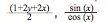
And if they do provide a mathematical free-response question type, that leads straight to the problem of mathematical equivalency. Students can take different paths to the
is the same as tan(x), and 1 - sin2(x) is the same as cos2(x). If the system can only accept a single correct answer, or even one of a fixed list of possibilities, other equivalent responses will be marked wrong. The student will be forced to spend unnecessary time and energy converting their answer to a particular format, or worse, told they got the answer wrong even though they didn't. This problem is infinitely worse in the case of open-ended questions. There are many meaningful assignment questions that have many different correct answers - sometimes even infinitely many. There is no way for an instructor to provide a list of all possible correct answers, in all possible variations, to such questions. The issues related to mathematical equivalency and open-ended questions are much less of a problem with human graders, who understand the mathematics and can validate an unexpected response, but they are extremely challenging problems for automated systems.

To be truly effective for a STEM course, an automated assessment system needs tobe able to handle the display and input of standard mathematical notation, support free response questions, correctly grade questions with more than one correct answer, and handle mathematical equivalency. Since most assessment systems do not have these abilities, STEM instructors have been left out, or even worse, forced to endure inadequate testing systems that did not allow them to properly assess their students' understanding.
Fortunately, there is an automated assessment tool that meets the needs of STEM education. Maple T.A., from Maplesoft, is an online testing and assessment system designed especially for mathematics, making it ideal for science, technology, engineering, and mathematics courses. Maple T.A. is based on Maple, the well-known mathematics software. With the power of Maple behind it, Maple T.A. has all the mathematical knowledge it needs to handle STEM assessment.
Math in Maple T.A. looks right. Questions use standard mathematical notation, from exponents and subscripts to integrals, square roots, and matrices. Students do not have to interpret the mathematical notation in the question, with the inherent risks of misinterpretation. They just read it.
Maple T.A. includes a math equation editor that allows students to enter their response using the same notation they would use on paper. No special syntax is required. Students use palettes, menus, and standard keyboard shortcuts, such as "/" to enter a fraction, to enter their response. They can immediately verify visually that their response is what they intended, because they are using familiar notation.
If the instructor chooses, Maple T.A. can automatically compare a student's response to the correct answer while taking into account mathematical equivalence. The author of the question only needs to provide one form of the answer, and Maple T.A. will determine if the response is equivalent or not.
Not only can Maple T.A. handle mathematical equivalence, but it can also apply the same kinds of mathematical tests that a human grader would do when evaluating a response to an open-ended question. For example, Maple T.A. can ask "Give an example of a function that has a minimum at x = 1", and then take the student's response, find the derivative, and evaluate it at x = 1 to see if the value is zero.
Algorithmic questions allow instructors to create a single question template, and then generate many different instances of the question by providing different values for one or more variables in the question template. Because of its inherent understanding of mathematics, Maple T.A. provides great exibility when it comes to de ning such questions. Instructors can set complex conditions for the variables in the question template, such as "a is a positive integer less than 15, b is a integer such that -30 > b > 30, b ≠ 0, and b is not divisible by a". In addition, since Maple T.A. understands mathematics, the variable in the question could be a more sophisticated mathematical object, such as "a prime number less than 100 or "a nxn matrix with integer entries all of absolute value less than 20, where n = 2, 3, or 4".
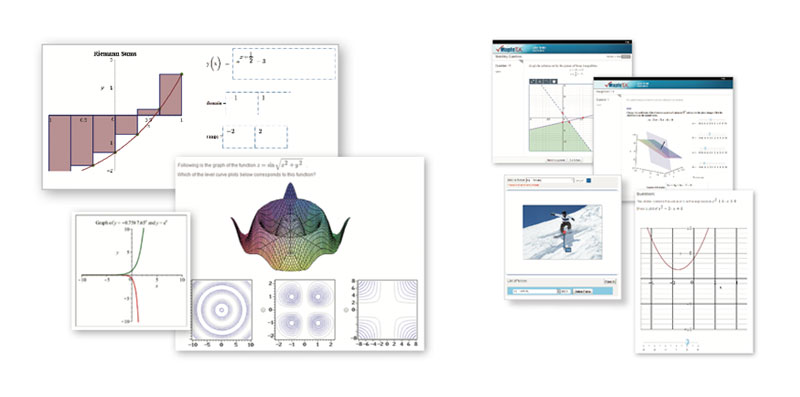
Visualizing functions, relations, and data is an important aspect of most technical subjects, and Maple T.A. makes it easy to include a huge variety of customizable 2-D and 3-D plots in assignment questions. The plots are created right inside Maple T.A., so there is no need to turn to other software to create the visualizations. In addition, the plots themselves are not just fixed images. They are generated as needed by Maple T.A., which means that for algorithmic questions involving plots, each version of the question can include a different plot.
Maple T.A. also lets instructors ask questions that require a student to sketch a graph in response, so they can test a student's understanding of these fundamental ideas without having to resort to pencils and paper. Graph sketching questions are graded automatically by Maple T.A.
Because Maple T.A. has Maple behind it, Maple T.A. can grade questions that rely on virtually any area of mathematics. Maple T.A. can be used in calculus, algebra, statistics, physics, chemistry, differential equations, economics, and many other topics.
In addition to the standard multiple choice, true/false, and numeric response style of questions, Maple T.A. includes many question types designed specifically for STEM courses. Examples include mathematical free response, numeric questions that handle a margin of error, graph sketching, free body diagrams, questions that handle units, and chemical formula questions.
Maple T.A. also supports Math App questions, where the body of the question is an interactive application the student can use directly inside Maple T.A. Math App questions are based on Maple documents, so instructors can provide a wide range of interactive applications. For example, Math App questions can provide students with specialized calculators, ask them to manipulate parameters until they have found the desired solution, or give them interactive plots to explore and answer questions about. As required, Maple T.A. will examine what the student does with the application, such as looking at the final position of a slider that controls a plot, and automatically grade the interaction.
Thousands of Maple T.A. questions are freely available to instructors for use in their own tests and assignments. These questions were created and shared by educators who used them in their own courses. Questions can be used as-is, or they can be customized as required. Question content is available for a variety of STEM subjects, including calculus, precalculus, algebra, physics, engineering, statistics, differential equations, and chemistry.
Maple T.A. provides a comprehensive set of authoring tools for both content customization and the development of new questions. These tools include a mathematical equation editor, powerful algorithm design tools for creating question templates, and a step-by-step question designer that walks the author through the creation of a wide variety of both STEM and non-STEM question types.