What's New in MapleSim - High-Performance Multi-Domain Modeling and Simulation - Maplesoft

What's New in MapleSim


MapleSim is updated several times a year, as we continually improve the product and respond to customer requests, to make new features available as soon as possible. On this page, you will find details about the latest enhancements and product developments in MapleSim that make it easier and faster to create models and run your simulations.


Getting the Update
The first major MapleSim release of the year is automatically sent to all MapleSim customers who are members of the Maplesoft Elite Maintenance Plan at that time. You will receive an email with instructions once the release is available. Subsequent updates throughout the rest of the year are issued through the Check for Updates mechanism built into MapleSim. Update releases can also be found by visiting Download Product Updates.

MapleSim 2025
MapleSim 2025.2

MapleSim 2025.2 offers a series of enhancements to save you time and effort when creating and analyzing simulations.

This release includes updated tools for comparing models and analyzing simulation data, and changes to the simulation code that improve runtime performance for MapleSim connectors.

The MapleSim 2025.2 update includes the following:

  • An upgraded Rerun Panel adds a faster means of performing a parameter sweep on a chosen parameter. This allows easy results comparisons from within the Results Manager.
  • The Parameter Sweep app now allows filtering by summary variables, making it easier to group and select them in larger models. The app has also received a performance boost when re-initializing between sweeps.

Available to: All MapleSim 2025 users.

Updates to the MapleSim Web Handling Library

The MapleSim Web Handling Library, an add-on to MapleSim, is used across the R2R (roll-to-roll) community to model and explore web lines and converting processes.

The 2025.2 update supports the following:

  • Halt simulation during extreme web responses: You can now define maximum web tension, maximum web stress, and minimum width (neck down) values to interrupt the simulation when reaching practical web limits.
  • Enhanced modeling of Spans: The web Span has improved handling of loss of tension, and the Sagging Span inputs now include the bending stiffness of materials.
  • Based on customer requests, when entering web speed you can use the units m/min.

Additional updates to Drives and Controls:

  • Using the new Tension Control with Torque Output component, engineers can apply a control approach using torque as the controller output.
  • Enhancements to the Controls section:
    • Gain scheduling is available as an option for all Control RW blocks.
    • All Position Control components now allow for sensor effects in the simulation.
  • New Utilities section:
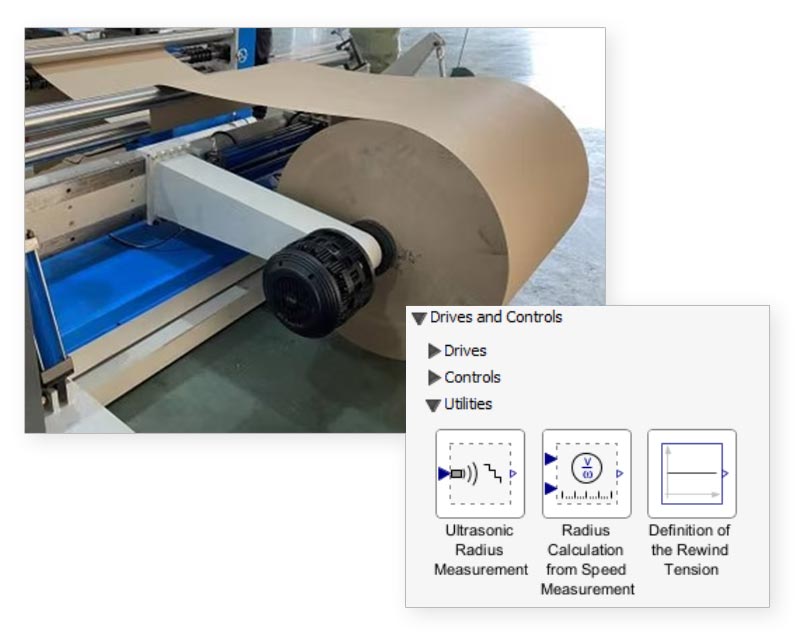
    • The new Rewind Tension Definition component lets users define the target tension profile in winding to align with PLC settings (Options: Constant, Taper, and Curve).
    • Additional roll radius input components make it easier to include radius measurements, by either simulating input from an ultrasonic sensor or by estimating roll radius from two speed signals.

This update also includes in-product MapleSim model examples highlighting the recent Drives and Controls features.

Available to: Existing users of MapleSim Web Handling Library 2025.


Additional Improvements to MapleSim Add-ons
  • The MapleSim CAD Toolbox offers support for recent software releases from Creo®, NX™, Parasolid®, and other CAD tools.
  • The new releases of B&R MapleSim Connector and MapleSim Connector for FMI offer additional speed-ups to their respective initialization code, as well as options that allow a more efficient compile for targets using C macros.

Available to: Existing MapleSim 2025 Add-on users.


MapleSim Insight 2025.2
  • The 2025.2 release of MapleSim Insight provides a maintenance update to align with the latest updates in MapleSim 2025.2.

Available to: All MapleSim Insight 2025 users.

MapleSim 2025

MapleSim 2025 offers a series of enhancements to save you time and effort when creating and analyzing simulations.

This release includes a new component library to support the modeling of motor drives, updates to several in-product apps that make it even easier to perform optimization and analysis, and an upgraded computation engine to take advantage of recent improvements that became available in Maple 2025.

New Component Library: Motor Drives

  • The new MapleSim Motor Drives Library brings additional resources to better simulate AC, DC, and Servo motors as part of your modeling projects.
  • This library is available within the base MapleSim product package, allowing you to include characteristics of custom motor drives alongside systems from other engineering domains such as hydraulic, pneumatic, electrical, and multibody elements.

Highlights include:

  • Servo Motor components. Engineers can use these new components to quickly explore how the motor behaviors will affect performance, productivity (cycle time), control response and machine vibrations of systems they design.
  • Evaluate motor drive performance with the built-in inverter drive and controls for AC synchronous and DC (Brushed or Brushless) motors.
  • Simulate single-phase and polyphase motor drives.
  • New in-product examples include PMSM, DC (Brushed), Brushless DC, and Servo motor models.


Updates to Model Analysis Apps

  • The Optimization and Parameter Sweep apps now let you limit the analysis time to a specific window - so you can ignore transients and focus on the most relevant results.
  • The updated Modal Analysis app has new options for better visualization and scaling, and now allows you to save time when updating the analysis by reusing a previously linearized model.

 Available to: MapleSim customers who are enrolled in the Maplesoft Elite Maintenance Plan at the time of its release. (Customers who were not under EMP at that time can contact Maplesoft sales to obtain an upgrade.)


Additional Improvements to Add-on Products
  • The MapleSim CAD Toolbox offers support for recent software releases from Catia® V5, Inventor®, Parasolid®, and other CAD tools.
  • This release of MapleSim Connector for JMAG®-RT adds compatibility for FEA models that use the latest version of JMAG-Designer, and also includes modeling options for synchronous reluctance motors, such as Wound Field Synchronous Motors (WFSM).

Available to: MapleSim customers who are enrolled in the Maplesoft Elite Maintenance Plan at the time of its release. (Customers who were not under EMP at that time can contact Maplesoft sales to obtain an upgrade.)


Courtesy of JMAG


Updates to MapleSim Insight
  • MapleSim Insight gives machine builders powerful, simulation-based debugging and 3-D visualization capabilities that directly connect to your automation tools. The 2025 release of MapleSim Insight adds support for models using any new MapleSim 2025 features.

Available to: MapleSim Insight customers who were enrolled in the Maplesoft Elite Maintenance Plan at the time of its release. (Customers who were not under EMP at that time can contact Maplesoft sales to obtain an upgrade.)

Learn about new features in previous releases of MapleSim

MapleSim 2025
MapleSim 2024
MapleSim 2023
MapleSim 2022